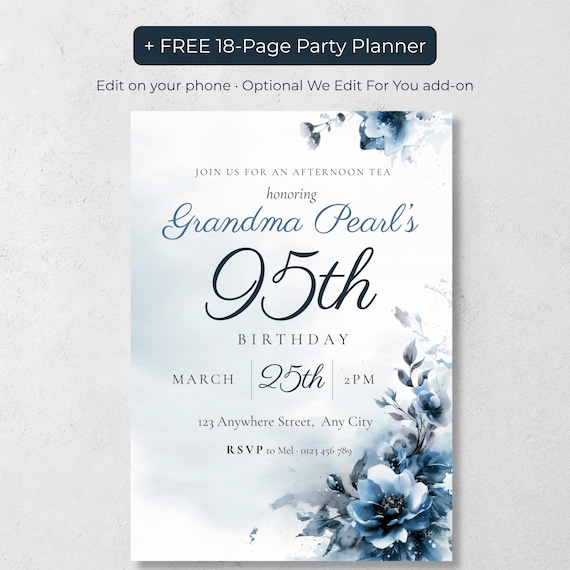
Many families send 95th birthday invitations in two formats: a texted phone-sized invitation for younger relatives and a printed 5x7 card for older guests. The PR Creative Digital navy watercolor 95th birthday invitation on Etsy is an editable Canva template that includes both a 1080x1920 mobile version and a 5x7 printable version in a matching design, plus a free 18-page printable party planner and a free digital party planner.
A 95th birthday guest list can easily span four generations. The grandchildren live on their phones, while Grandma's friends may not check email at all. Choosing just one format almost always leaves someone out, so most families planning a 95th end up doing both.
Here's how to decide who gets what, and how to do it without designing two invitations.
Who should get a texted invitation
Texted invitations (sometimes called evites) are best for:
- Children, grandchildren and great-grandchildren
- Out-of-town relatives who need the details on their phone while traveling
- Anyone who might forward it to a partner or a driver
- Guests you're inviting closer to the date
A texted invitation is instant and free to send, and guests can save the image and find the address in seconds. Send it as an image, not just a line of text, so it feels like a real invitation.
Who should get a printed invitation
Printed 5x7 invitations are best for:
- Grandma's friends, neighbors and church or club members
- Older relatives who don't text or rarely check their phone
- Anyone at Grandma's senior living community (a printed card on the notice board helps too)
- Keepsakes: Grandma herself will likely want one, and it's lovely in a memory book
You can print at home on card stock, or send the file to a local print shop, Staples or Office Depot for same-day prints.
How to do both without designing twice
The trick is to start with a template that already includes both sizes in a matching design. You enter the details once, then download a phone version to text and a 5x7 version to print.
The 95th Birthday Invitation for Women, Navy Watercolor Canva Template works exactly this way. It includes a printable 5x7 invitation and a 1080x1920 mobile version with the same soft navy watercolor florals, both editable in Canva with a free account. You can change the name, date, time, address and wording on a phone, tablet or computer.
Tips for texting a 95th birthday invitation
- Send a short message with the image: "We're celebrating Grandma's 95th! Details are on the invitation. Please RSVP to Mel by March 1."
- Use a group text carefully. For large families, individual texts or a family group chat avoid reply-all chaos.
- Add the address as text too, so guests can tap it to open their maps app.
- Send a reminder a few days before. It's especially helpful for open-house style parties.
Tips for printing a 95th birthday invitation
- Use heavier card stock (around 100–110 lb cover) so the invitation feels special.
- Print a test page first to check colors, since screens and printers can differ slightly.
- Use larger RSVP details if many guests have trouble reading small print.
- Mail 4–6 weeks ahead, earlier than you would for a younger person's party.
The bottom line
For a 95th birthday, the right answer to "text or print?" is usually "both." Text the people who live on their phones, mail cards to the people who don't, and use one matching design so everyone receives the same beautiful invitation.
Frequently Asked Questions
Is it OK to text a 95th birthday invitation?
Yes, for younger relatives it's often the easiest option. Pair it with printed invitations for older guests who don't text.
Does the navy 95th birthday template include a phone version?
Yes. It includes a 1080x1920 mobile version for texting, email or social media, plus a printable 5x7 version.
Can I edit the invitation on my phone?
Yes. The template is edited in Canva, which works in the app on phones and tablets as well as on a computer.
Is anything shipped?
No. It's a digital download, so you print it yourself or at a print shop, or send it digitally.