A teen beach birthday invitation like this is a digital, editable Canva template built for coastal, tropical, or pool-themed birthdays for girls roughly ages 11–16. You personalize the name, age, date, time, and location yourself in Canva, then print it or send it digitally — no physical item ships and no design experience is needed.
What to look for in a teen beach birthday invitation
Three things separate an invitation that feels teen-appropriate from one that feels like a kid's design wearing a swimsuit:
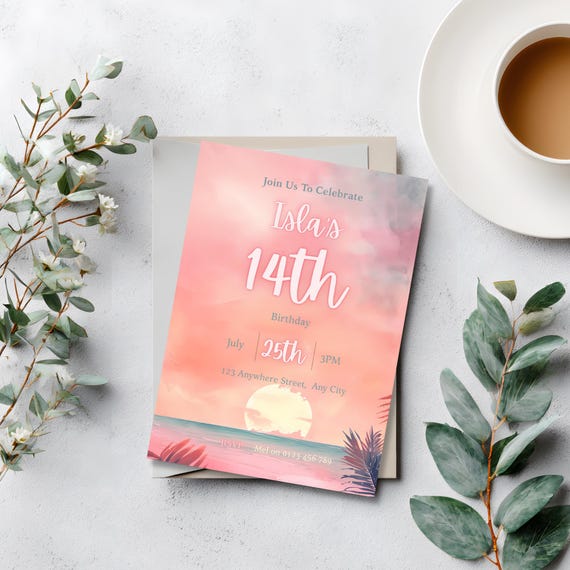
- A grown-up color story. Warm coral, peach, and golden sunset tones read as stylish; primary-color palm trees and cartoon flamingos read as young. A watercolor sunset with a calm ocean scene splits the difference — tropical, but not childish.
- Real editability, not just a name swap. You want to change the name, age, date, time, and location without fighting the template. Fixed background art with an open, uncluttered center for text is the format that holds up best across ages and party styles.
- A format that works for how you're actually sending it. Most families now send digital invitations by text, email, or social media first and print a keepsake copy later, if at all. A template that only works one way — print-only, or too large to text cleanly — creates extra steps you don't need.
Canva template vs. a generic printable
A generic PDF printable gets you a design, but if you need to fix a typo or the party moves from 3 PM to 4 PM, you're often stuck re-downloading or emailing the seller. An editable Canva template solves that: you open the file in a free Canva account, update the text yourself, and export it again whenever something changes — no design experience required. For a teen party specifically, where RSVP details can shift right up until the week of, that flexibility matters more than it does for, say, a first birthday invitation locked in months ahead.
A design that already fits the brief
The Teen Girl Tropical Sunset Invite was built around exactly this gap — a coastal, watercolor sunset design in warm coral and golden tones, with palm frond details kept subtle rather than cartoonish, and a clean center space so the text editing stays simple. It's sized at 5x7 inches, fully editable in Canva (free or Pro), and works equally well printed at home, printed professionally, or sent digitally for a beach, pool, or sunset-themed birthday.
Frequently Asked Questions
Is this invitation only for beach parties, or does it work for pool parties too?
It works for any coastal-adjacent theme — beach, pool, or sunset-themed birthdays — since the design leans on warm tones and an ocean scene rather than beach-specific props.
Can I edit the colors and fonts, or just the text?
The text (name, age, date, time, location, RSVP details) is fully editable in Canva. The watercolor background artwork itself is fixed and not editable.
Do I need a paid Canva account?
No — a free Canva account is enough to open and personalize the template.
Can I send it digitally instead of printing it?
Yes. Once you've edited it in Canva, you can download it and send it by text, email, or social media, or print it at home or at a local print shop.