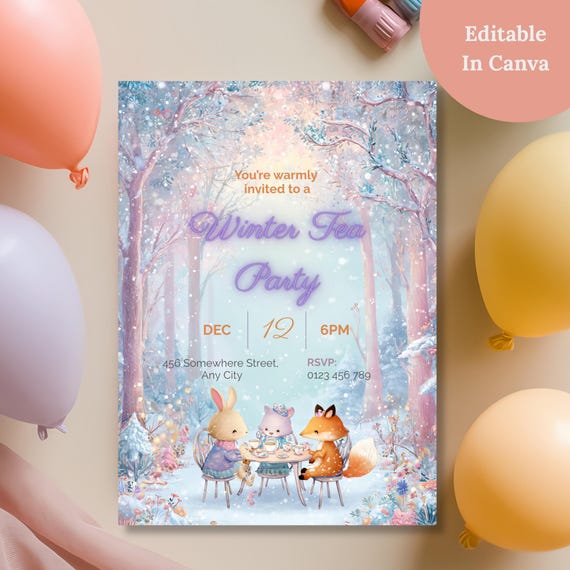
This is an editable Canva invitation template designed for a kids' winter tea party or birthday, requiring only a free Canva account to personalize. It comes with a printable 5x7in file, a mobile digital version, and a free 18-page party planner bonus, delivered instantly as a digital download.
Searching "editable Canva invitation template for kids birthday" usually means you're past the Pinterest-scrolling stage and ready to actually buy something — you just want to make sure you're not about to pay for a template that's a hassle to edit or that locks you into a paid Canva plan. Here's what separates a genuinely easy template from a frustrating one.
What "editable in Canva" should actually mean
Not every listing that says "editable" delivers the same experience. Before buying, it's worth checking:
- Does it require a paid Canva account? Good templates are built entirely with free Canva elements, so a free account is all you need.
- What can you actually change? Text is almost always editable. Background artwork and illustrations usually aren't — and that's normal, not a flaw, since it protects the design's look. The listing description should say clearly which parts are fixed.
- How do you get the template link? After purchase, you should receive a PDF with the Canva link and instructions — not a vague promise to "message the seller for access."
- Is there a mobile-friendly version? A lot of invitations get shared digitally now rather than printed, so a template that includes a phone-screen-sized version (rather than just a printable PDF) saves you a separate design step.
How to tell a well-made template from a rushed one
A few signals to look for on the listing page itself:
- Clear "How It Works" steps. If the seller lays out exactly what happens after purchase — download, personalize in Canva, download your finished design — that's a sign they've thought through the buyer experience.
- Real reviews mentioning ease of editing. Comments like "super easy to edit" or "sent it to friends and they loved it" tell you more than the product photos do.
- What's included, spelled out. A trustworthy listing states plainly whether you're getting one file or several, and whether anything extra (a matching digital version, a bonus planner) is included.
Where this template fits
The Winter Tea Party Invitation, Editable Canva Template checks each of those boxes: it only needs a free Canva account, the text fields (name, date, time, location, RSVP) are editable while the woodland fox-and-rabbit artwork stays fixed, delivery is an instant PDF with your template link, and it includes both a 5x7in printable version and a 1080x1920px mobile version for sharing digitally. It's built around a kids' winter birthday or tea party theme specifically, so the wording and layout are already suited to that occasion rather than a generic all-purpose invite you'd need to heavily rework.
Frequently Asked Questions
Do I need a paid Canva subscription to use this?
No. A free Canva account covers everything needed to edit and download the template.
Can I edit it from my phone?
Canva works on mobile and tablet, though editing tends to be easier on a desktop for precise text placement.
What if the background colors don't match my party theme?
The background artwork itself is fixed and can't be recolored — only the text can be changed. If you need a fully custom color palette, that's worth checking before you buy any fixed-background template, not just this one.
The bottom line
An editable Canva template is only as good as how clearly the seller explains what's editable, what's included, and how you'll actually receive it. Look for those details spelled out on the listing before you buy, and you'll avoid the common frustration of paying for a template that turns out to need more design work than expected.