An editable kids' tea party invitation is a Canva template you personalize online with a free Canva account, changing the name, age, date, time, address and RSVP, then downloading it to print or text. The woodland winter tea party invitation includes a 5x7 printable and a 1080x1920 phone version, with a free 18-page party planner and a free party planner web app. The illustrated background stays fixed, and all of the text can be changed.
You've found a tea party invitation you love, and it says "editable Canva template." If you've never used Canva, that can sound like extra work. It isn't. Here's exactly what you get, how to change the text in about ten minutes, and how to send it as a printed card, a text message, or both.
What "editable Canva template" actually means
When you buy an editable invitation on Etsy, you don't get a flat picture. You get a link to a design in Canva, a free online design tool. Opening the link makes your own copy, and you can:
- Change every word: name, age, date, time, address and RSVP details
- Change fonts, text colors and text sizes
- Add or delete lines (for example "Siblings welcome" or "Cozy sweaters encouraged")
- Download it as a high-quality PDF, JPG or PNG
What usually stays fixed is the illustrated background, the artwork itself. That's normal and keeps the design looking professional.
Do you need a paid Canva account? No. A free Canva account is enough to open, edit and download a template like this.
Step-by-step: editing your invitation in Canva
- Download the PDF from Etsy. After purchase, go to Purchases & Reviews on Etsy and download the file. It contains your template link and instructions.
- Click the template link. It opens in Canva. Log in or create a free account, and Canva makes a copy that's yours to edit.
- Click any text to change it. Type over the sample name, age, date and address. Double-check the RSVP date and phone number, the two details parents need most.
- Adjust if needed. If a long name doesn't fit, make the text box a little wider or reduce the font size by a point or two.
- Download. Click Share, then Download. Choose PDF Print for printing, or PNG for texting and social media.
Print it, text it, or both
Printing at home: use the PDF Print download on white cardstock (about 80–110 lb). Print one test copy first and check the colors. A 5x7 invitation fits standard A7 envelopes.
Printing at a store: send the PDF to an office supply or photo print shop and ask for 5x7 cardstock prints.
Texting: this is where a phone-sized version really helps. A 1080x1920 version fills a phone screen, so text it, share it on WhatsApp, or post it to a class parents' group without anyone needing to zoom. Add a short message like "Olivia's 5th birthday tea party! Details in the invite, please RSVP to Sarah by Dec 1."
Many parents do both: printed cards for grandparents and close family, and texts for school friends.
An example: a woodland winter tea party invitation
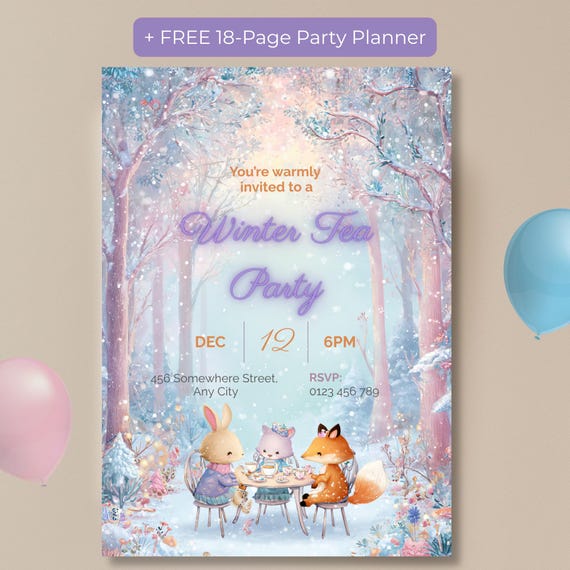
Our Kids Winter Tea Party Invitation, an editable Canva woodland animal invite is built for exactly this workflow. A fox, bunny and kitten share tea in a pastel snowy forest. All of the text is editable with a free Canva account, and you get both a 5x7 printable version and a 1080x1920 phone version.
It also includes two free bonuses: an 18-page printable party planner and a party planner web app with a checklist, timeline, guest list, menu planner, gift tracker, budget and shopping list. No account or login is needed for the web app.
Short on time? You can add our We Edit For You service, and we'll personalize the invitation for you. It's an add-on, so buy it together with the invitation template.
Common mistakes to avoid
- Forgetting the RSVP date. Without a reply-by date, half the replies arrive the night before.
- Texting the print version. A 5x7 file looks small on a phone. Send the phone-sized version instead.
- Printing on thin paper. Regular copy paper curls and looks flat. Cardstock makes a big difference.
- Not proofreading. Read the date, time and address aloud once before downloading.
The bottom line
An editable kids' tea party invitation takes about ten minutes: open the link, type your details, download, then print or text. Choose a template with a phone version if you plan to text, use cardstock if you print, and always include an RSVP date.
Frequently Asked Questions
Do I need Canva Pro to edit a tea party invitation template?
No. A free Canva account is enough to open, edit and download the template.
Can I text an editable invitation to parents?
Yes. Download the phone-sized (1080x1920) version as a PNG and send it by text, WhatsApp or social media.
Can I change the background or colors of the artwork?
The illustrated background is fixed, but you can change all of the text, including fonts, sizes and text colors.
Is this a physical invitation?
No. It's a digital download. You print it yourself at home or at a print shop, or share it digitally.