An editable princess birthday invitation is a Canva-based template where you personalize the name, age, date, and party details yourself, then download and print — as opposed to a one-time-use printable locked to a single age or a physical card ordered pre-made from a printer. The strongest versions include a mobile-friendly digital evite size and genuinely work for any age, not just the birthday shown in the preview image.
If you're searching for a princess birthday invitation, you've probably already noticed the problem: most of them are locked to one specific age. You find the perfect design, and then realize it says "Turning 4" baked right into the artwork, with no way to change it for your daughter's 5th, 6th, or 7th birthday. Here's what actually separates a truly editable template from one that only looks editable.
What Actually Makes an Invitation "Editable"?
Not every invitation labeled "editable" works the same way. There are three common formats sold on Etsy, and they behave very differently:
- Flat printables — a static PDF or JPG you print as-is. Nothing changes. What you see in the preview is exactly what arrives at your printer.
- Fill-in-the-blank templates — usually a Corjl or "print-on-demand" style file where you can swap the text but the layout is rigid, and the age is sometimes part of a locked graphic element rather than a text box.
- True editable Canva templates — you receive a link to a real Canva design, and every text field (name, age, date, time, location, RSVP) is a live, editable box you can type into and resize.
Only the third type genuinely works for "any age." If a listing doesn't specify that the age itself is an editable text field, don't assume it — some designs bake the number into the illustration, which means what you see in the thumbnail is the only age you're getting.
What to Check Before You Buy
Before adding an editable princess invitation to your cart, run through this short checklist:
- Is the age confirmed as editable text? Look for the listing to explicitly say the age, name, and date are all customizable — not just "personalizable," which can mean something more limited.
- Do you need a paid Canva subscription? Most well-built templates work entirely inside a free Canva account. If a listing requires Canva Pro, factor that into the real cost.
- Is there a mobile-friendly version? A growing number of parents send invitations as a text or group chat image instead of printing them. A template that only comes in a 5x7" print size will look awkward cropped for a phone screen — look for a dedicated 1080x1920px "story" or mobile file.
- What exactly is NOT editable? Every template has some fixed elements — usually the background artwork and illustrations. A trustworthy listing will say so clearly rather than let you assume everything can be changed.
- Is there real customer proof? Star Seller status, review count, and a shop that's been active for a while are reasonable signals that the download link works and the seller responds if something goes wrong.
Where This Comes Together
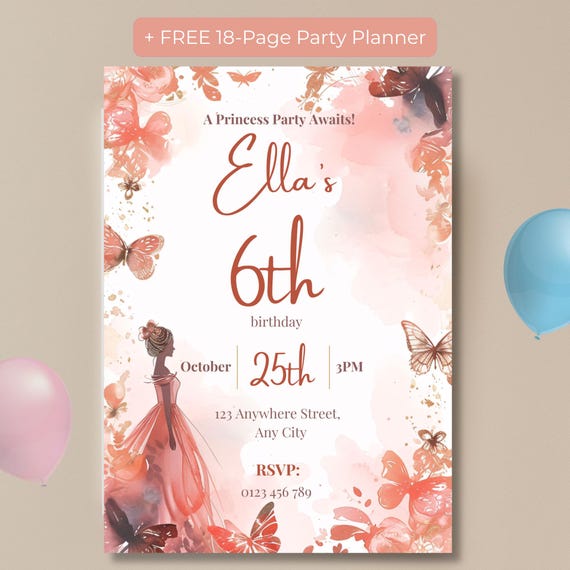
An Editable Princess Birthday Invitation, Any Age, Watercolor Butterfly Floral, Rose Gold Canva Template is a useful example of the "true editable" category done right: the age, name, date, time, and RSVP details are all live text fields inside a free Canva account, while the watercolor butterfly and floral artwork stays fixed as the design's signature look. It also comes with a 1080x1920px mobile version for anyone planning to send it digitally instead of printing, plus a free bonus party planner to help with everything beyond the invitation itself — guest list, budget, and timeline included.
Frequently Asked Questions
Is an editable Canva invitation the same as a printable PDF?
No. A plain printable is usually a flat, one-time file. An editable Canva template gives you a live link you personalize yourself — name, age, date, RSVP — before downloading, so one template can be reused for different birthdays.
Can I really use the same template for any age, not just the age shown in the preview?
Yes, if the listing states the age is editable text rather than part of the artwork. Always check the customization notes — some templates lock the background art but leave every text field, including the age, fully editable.
Do I need Canva Pro to edit these templates?
No. Most editable Etsy invitation templates work with a free Canva account — no paid subscription required.
Can I send it as a digital evite instead of printing it?
Yes — look for a listing that includes a mobile or "story-size" version (1080x1920px) built for phone screens, not just the standard 5x7" print file.
The Bottom Line
"Editable" is doing a lot of work on Etsy right now, and it doesn't always mean the same thing from listing to listing. Before you buy, confirm the age is a real editable text field, check whether you need a paid Canva account, and see if a mobile-friendly version is included. Get those three things right and you'll have a princess invitation that actually grows with your family instead of a one-and-done file for a birthday that's already passed.