A princess invitation is only genuinely reusable across birthdays if the age is a text field, not baked into the artwork. Templates with the age as editable text let you personalize the same design for a 1st birthday, a 5th, or a 10th, instead of buying a new template every year.
Why "locked-in" age graphics are a common problem
Scroll through princess invitation listings and a lot of them look perfect — right up until you notice the age is illustrated as part of the graphic itself, sometimes even inside a decorative number design. That's fine if the age matches exactly what you need, but it means the template can't be reused for a sibling's party next year or a different milestone birthday down the track.
It's an easy detail to miss while browsing thumbnails, and it only becomes obvious once you've purchased and opened the file in Canva.
What actually makes an invitation editable for any age
The difference comes down to whether the age is a text box or part of the artwork:
- Text-based age: the number sits in an editable text field, so you can type any age and it re-renders in the template's font and color.
- Graphic-based age: the number is illustrated or embedded into the background art, meaning it's fixed and can't be changed without redesigning the whole piece.
Before buying, it's worth checking the listing photos or description for language like "editable text" versus "customizable design" — the second phrase sometimes just means colors or fonts can change, not the actual age.
A watercolor design built to fit any birthday
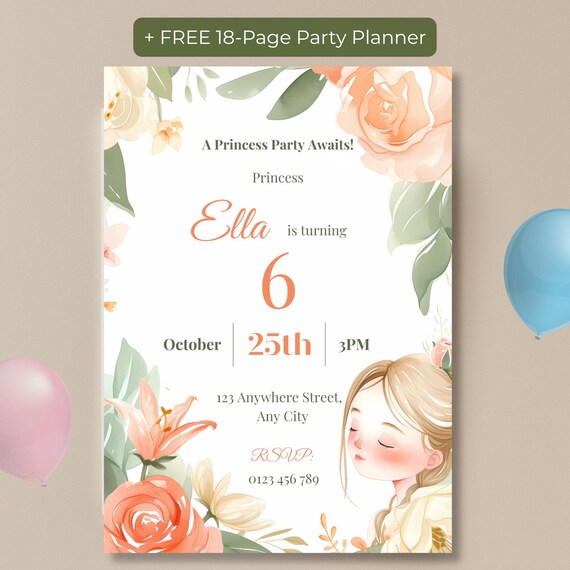
The Princess Birthday Invitation Editable Template keeps the age, name, date, time, location, and RSVP details as editable text over a fixed watercolor floral background — so the artwork stays consistent while every detail, including the age, updates to whatever birthday you're planning. That means the same purchase can realistically be reused for more than one occasion, rather than being tied to a single birthday.
Frequently Asked Questions
Can I really use the same template for more than one birthday?
Yes — since the age is an editable text field rather than part of the artwork, you can update it for a different birthday each time you use the template.
What parts of the design can't be changed?
The background artwork and illustration stay fixed; the editable parts are the text — name, age, date, time, location, and RSVP details.
Does it work for a 1st birthday as well as an older milestone birthday?
Yes, the design isn't tied to a specific age or milestone, so it works from a 1st birthday through a 10th.