To text a Christmas party invitation, design it at phone size (1080x1920 pixels, portrait), download it from Canva as a PNG, and send it to each guest or a group chat with a short personal message and an RSVP date. An editable Canva evite with a matching 5x7 printable lets you text most guests and still print a few for relatives who prefer paper.
Why texting your Christmas invitations works
December is the busiest party month of the year, and invitations that arrive by mail can sit unopened under a pile of catalogs. A text lands on the phone your guests are already holding, it's free to send, and replies come back in minutes. The catch is that a plain text message ("party at ours on the 15th?") is easy to forget. A designed invitation image gets saved, screenshotted and remembered.
Use the right size
A printed 5x7 card squeezed onto a phone screen leaves tiny text and big empty borders. For texting, use a tall portrait image:
- 1080 x 1920 pixels fills a phone screen and keeps the text readable.
- PNG keeps the text crisp. JPG is fine if you need a smaller file.
- Big, short lines: headline, date and time, address, RSVP. Save the long details for your message.
Step by step: from Canva to your guests' phones
- Open your template in Canva (browser or the Canva app on your phone).
- Edit the details: date, time, address, RSVP name and number, and a line about what's planned.
- Check it at phone size: zoom out until it's the size of a real phone screen. Can you still read the address?
- Download as PNG (Share > Download > PNG).
- Send it with a personal note: "We'd love to have you at our farm Christmas party! Details are on the invite. Please RSVP by December 1."
Group text or individual messages?
- Individual texts feel more personal, and replies don't flood everyone's phone. Most phones let you send the same image to several people one at a time.
- A group chat works for close family or a team, and it's handy for last-minute updates ("Bring a chair!").
- Avoid giant group texts with people who don't know each other. One "reply all" thread can annoy guests before the party even starts.
Timing and follow-up
- Send invitations three to four weeks ahead in December.
- Ask for an RSVP date about a week before the party, so you can plan food.
- Send a friendly reminder two or three days before, with parking or gate details.
Print a few, too
Grandparents, neighbors without smartphones and anyone who likes a card on the fridge will still appreciate paper. Choose a design that comes in both sizes, so the printed card and the text match.
An invitation built to text or print
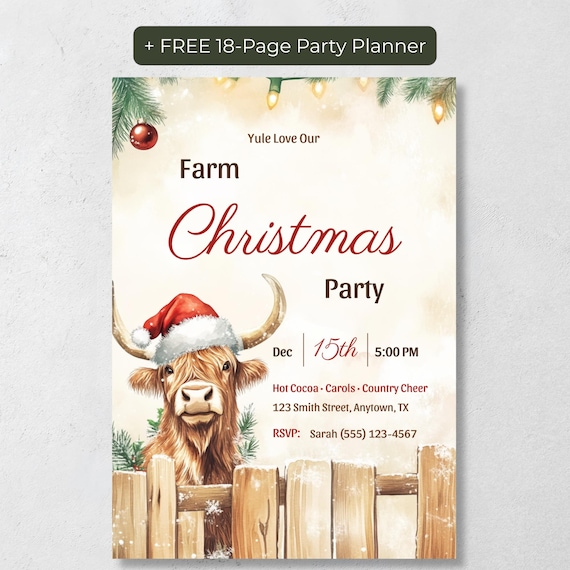
Our Editable Highland Cow Christmas Party Invitation comes in both formats: a 1080x1920 phone version ready to text and a 5x7 printable for the fridge, with the same watercolor highland cow in a Santa hat on each. Edit every word in Canva, download, and send it the same day. It's an instant download, so there's no waiting for a link, and it includes a free 18-page printable party planner and a digital party planner web app.
The bottom line
A texted invitation can feel just as special as a mailed one if it's designed for a phone screen, sent with a personal note, and backed up with a clear RSVP date. Text most guests, print a few for the paper lovers, and you're done before the cookies are out of the oven.
Frequently Asked Questions
What size should a texted Christmas invitation be?
1080 x 1920 pixels in portrait fills a phone screen and keeps the text readable. The highland cow template includes a phone version at exactly this size.
Can I edit the invitation on my phone?
Yes. Open the template link in the Canva app to edit and download it on your phone or tablet.
Can I print the same design as well?
Yes. The listing includes a 5x7 printable version alongside the phone version, so the texted and printed invitations match.
Do I have to wait for the template link?
No. It's an instant download. The PDF with your Canva links is available as soon as payment is confirmed.