A video game themed birthday invitation typically pairs a playful "Level Up" or "Game On" headline with the child's name, new age, and standard party details like date, time, and RSVP. Editable Canva templates let parents plug in this wording without writing it from scratch, which is the fastest way to get a polished, on-theme invite ready to send.
What to say on a video game birthday invitation
Staring at a blank invitation template trying to figure out what to actually write? The best gaming party invitations lean into a "leveling up" or "game on" concept rather than standard birthday wording. Here are lines parents use often, ready to adapt:
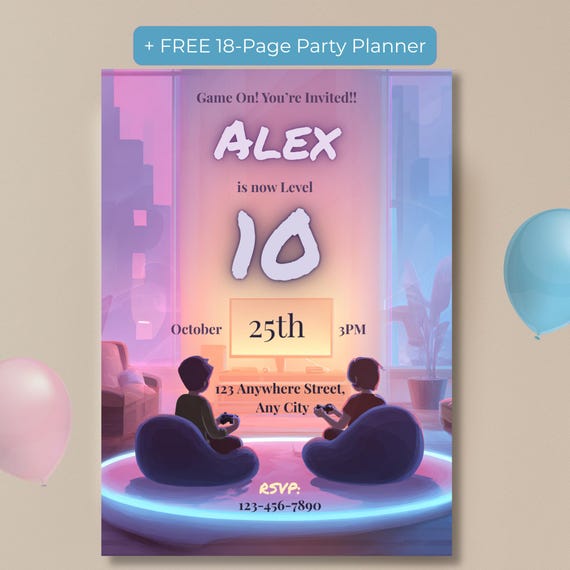
- "Game On! You're Invited!!" — a simple, punchy header that works for any age
- "[Name] is now Level [Age]!" — turns the birthday number into a fun milestone
- "Insert Coin to Join the Party!" — great for an arcade-style theme
- "Player 2 Needed — You're Invited!" — playful, works well for a smaller guest list
- "Boss Level: Turning [Age]! Come Celebrate With Us." — good for a milestone birthday like a 10th or 13th
- "Get Ready for Epic Wins, Snacks, and Multiplayer Fun!" — a good subheading under the main invite text
Keep the tone light and let one phrase carry the theme — you don't need every line to be a gaming pun. One strong headline plus clear party details reads better than an invitation stuffed with jokes.
How to choose wording that fits your party
A few things to think through before you finalize the text:
- Match the intensity to the theme. A neon arcade party can carry punchier, louder wording than a low-key game night with a few friends.
- Don't bury the details. Date, time, address, and RSVP information should be easy to spot at a glance — save the puns for the headline, not the essentials.
- Personalize with the age or milestone. "Level 10," "Unlocking Level 13," or "Boss Level: 8" all work well and make the invite feel specifically for your child, not generic.
- Decide print vs. digital early. If you're texting the invite instead of printing it, keep the wording short enough to read comfortably on a phone screen.
Skip the blank page — start from a template
If writing all of this from scratch feels like more effort than you have time for, you don't have to build it yourself. The Video Game Party Invitation, Editable Gaming Birthday Invite, Level Up Neon Gamer Boy Template already has this kind of wording built in — you just swap in your child's name, age, and party details inside Canva, then download and send. It also comes with a free 18-page party planner and a free digital planner app, so the wording is really just the first step sorted.
Frequently Asked Questions
Do I need Canva Pro to write my own gaming party invitation?
No — the free version of Canva works fine for editing a template like this one.
Can I edit the wording and colors on a video game invitation template?
Yes, text, font color, and size are editable; the illustrated background artwork stays fixed as designed.
Is video game party wording good for a milestone birthday?
Yes — phrases like "leveling up to 10" or "unlocking level 13" work well for any milestone age, since the number is simply typed in.
Can I send a video game birthday invitation digitally instead of printing it?
Yes — many gaming-themed templates include a mobile-sized version made for texting or sharing digitally, in addition to the printable version.
The bottom line
Good video game party wording doesn't need to be complicated — one theme-appropriate headline, the essential details, and a personalized age or milestone number are all you really need. If you'd rather not draft it yourself, starting from an already-worded, editable template is the quickest way to get from blank page to ready-to-send invite.